Shareaholic

Janet AronicaHow to Save This Cyber Monday With Shareaholic Deals
by at 9am, November 28th, 2011

Happy Cyber Monday, Internets! Here’s our early holiday gift to you: Shareaholic Deals is live. We hinted at this before, but now that we’re up-and-running we’re thrilled to share some screenshots and show you how to save.

First, install the Shareaholic Chrome plugin.

Once you’ve done that, you’ll start seeing a little dollar sign in the corner of your website wherever you’re shopping online. Here’s what it looks like on Zappos.com.
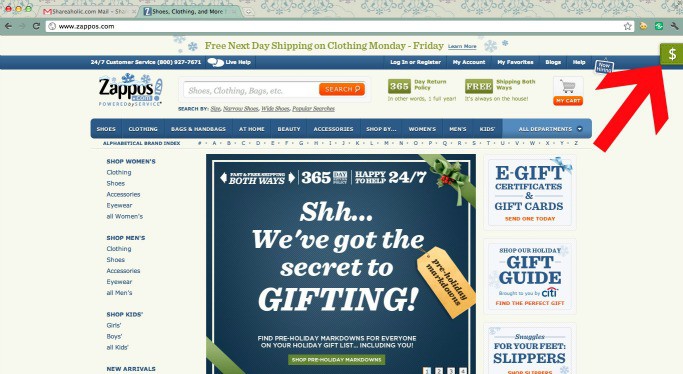
Shareaholic Deals on Zappos

Click on that little dollar sign, and you’ll see coupon codes and deals for your site. Here are all the savings for Zappos:
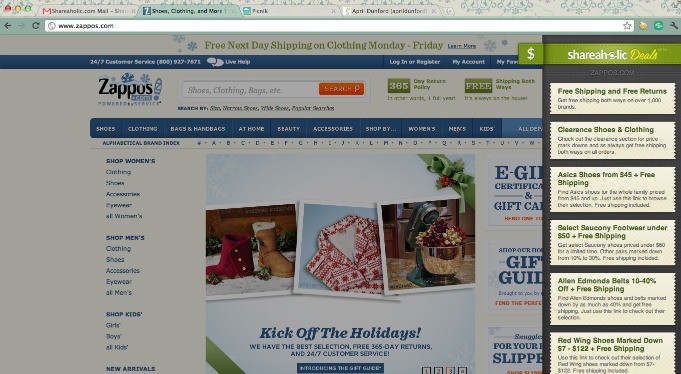
Finally, shop away!

Our screencast will explain a little more:

How will you use Shareaholic Deals in your holiday Shopping? Let us know in the comments!

__________________________________________________________________

Want to start saving with Shareaholic Deals today? Get started by downloading our Google Chrome plugin.

Save With Shareaholic Deals!


Done reading? subscribe: To get an automatic feed of all future posts subscribe here, or to receive them via email enter your email address in the box in the right column.

Link to This Post:    

Posted under: Updates

Post comment as twitter logo facebook logo
Sort: Newest | Oldest

Hi Kelson -

Thank you so much for taking the time to give us your feedback. We really value you as a user and want to win you back. You can disable the Deals under your personal settings at this link - https://www.shareaholic.com/account/advanced How could we have announced this more effectively to alert our great users like you?

- Janet Aronica, Head of Marketing - Shareaholic

KelsonVibber 5 pts

Now that I know that Shareaholic is able and willing to modify HTTPS sites without flagging a warning, I'm uninstalling it as a security risk. With it active, I can no longer trust that secure sites haven't been modified in some way.

gourou 5 pts

I'll mainly be celebrating by uninstalling the plugin and not using Shareaholic.

This is very distracting and a breach of the trust I placed in you when I installed the plugin a few months back.

This change should have been clear when the plugin updated, that didn't happen. A lot of care needs to be taken when you do something so fundamentally different the expected behaviour. Then users can make a choice about continuing to use the plugin or not without it feeling like a bait and switch (see Awesome Screenshot's furtive changing of Google results for a prime example.)

JanetAronica 23 pts moderator

gourou I apologize we weren't able to make Shareaholic Deals seem valuable and I'm disappointed to hear that you won't be using the service anymore. How can we alter the icon so that it is not distracting? We'd love your feedback. If you have any other thoughts or concerns feel free to reach out to me at jaronica@shareaholic.com.

Warmly,

Janet Aronica

Head of Marketing

Shareaholic.com

gourou 5 pts

JanetAronica Thanks for replying Janet :-)

In the first instance Shareaholic modified the websites I was looking at without giving me the option of opting out of such behaviour first in a clear and honest way.

When Shareaholic acts this way, I feel I can't trust you with my personal data or browsing habits.

There was very little indication the icon was not part of the website I was visiting, because it's not what I expect from Shareaholic.

The icon itself is one of the first things to appear on a loading site, and is animated, drawing attention to itself and distracting from the web browsing I was actually trying to do. I don't use shareaholic enough for it to be making such an impression on my web browsing.

Thanks again for taking the time to reply :)

- Paul.

Trackbacks

  1. [...] { box-shadow: 0px 0px 2px #333333; } We are thrilled to announce our winner of our Shareaholic Deals Facebook page giveaway! Congrats to Michelle Dalgo, who received a $100 AMEX card to enjoy while [...]